
Job Cost & Cutting Time Calculator for CorelDRAW
Stop guessing quotes. eCut measures cut length and area, prices materials and services by colour, and estimates machine time — all from the design in CorelDRAW.
Quick answer
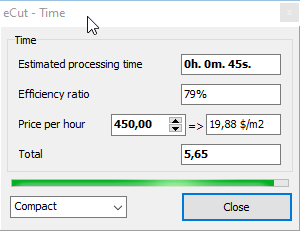
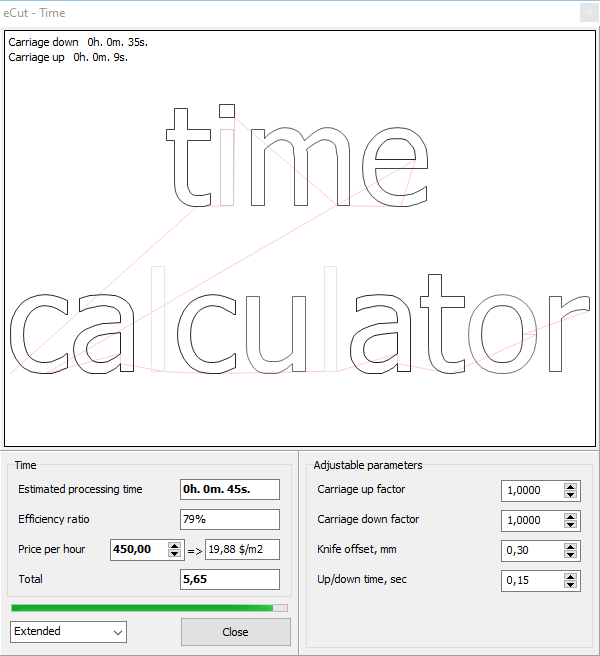
Colour your objects by material, select them and open eCut → Cost. eCut matches fills and outlines to your saved materials and services and shows the price. eCut → Time estimates how long the plotter or CNC will take; Perimeter and Area give exact cut length and size.
What it does
Cost by colour
Save your materials and services once. eCut matches each object’s fill or outline colour to a material/service, so you never pick them line by line.
Time-based pricing
Turn on “take time into account” and eCut uses your hourly rate when it is higher than the standard price, marking that price in bold.
Machine time
Estimates processing time for plotters, cutters and even CNC. Extended mode lets you tune coefficients and shows where the machine slows down.
Perimeter and area
Precise cut length and area for selected objects — the numbers you need for blade wear, routing time and material.
How to use it
- 1In eCut → Cost, add your materials (e.g. vinyl, ACP, acrylic) and services with prices.
- 2Colour the objects in your design to match.
- 3Select them and open Cost to see the job price.
- 4Open Time to see the machine time and add it to the quote.
New to eCut? Install it in CorelDRAW first — it takes about 10 minutes.
Screenshots


Who it's for
- Sign shops quoting vinyl, flex and ACP jobs
- CNC and laser job shops pricing by machine time
- Owners who want consistent quotes from every designer
- Anyone checking blade or router path length before cutting
Part of one eCut license
This tool comes with eCut together with true-shape nesting and 40+ other functions — one lifetime license (₹8,500), CorelDRAW X3–2026, free AnyDesk setup in India. See all functions.
Questions
Can CorelDRAW calculate the cost of a sign job?
With the eCut plugin, yes. eCut Cost prices selected objects from your saved materials and services, matched by fill or outline colour, and can include time-based pricing.
How do I estimate plotter or CNC cutting time?
Select the paths and open eCut → Time. It estimates processing time; in extended mode you can tune coefficients for your machine and see where it will slow down.
Something else? Ask us on WhatsApp — we can show it on your own file over AnyDesk.
More eCut tools
Try cost & time calculator on your own files
Free 4-day demo with every function, or buy the genuine lifetime license.