
Contour Cutting & Plotter Output in CorelDRAW
Send cut jobs to your plotter and prepare print-and-cut sticker sheets without leaving CorelDRAW — no export to Artcut, FlexiSign or other cutting software.
Quick answer
eCut adds a Cut/Plot window and a Contour Cutting File tool to CorelDRAW. Cut/Plot sends your curves to the cutter (through the plotter driver, or directly to a COM port with eCut’s eCom tool for Chinese cutters). Contour Cutting File fills a sheet with stickers, adds crop marks and makes separate print and cut files.
What it does
Cut straight from CorelDRAW
Pick your plotter, save presets per cutter and material, sort objects bottom-up, and roll the media or send the carriage back to origin from the same window. Or "print to file" to save a PLT job.
Smoother cuts than the driver
eCut prepares the cut file itself, with algorithms that smooth curves, change the start point, sort paths and emulate blade offset — useful when cutting through the driver gives jagged long curves.
Chinese cutters on COM port
Cutters without blade offset can stop in wrong places through the Windows driver. eCut’s eCom writes the job straight to the cutter’s COM port instead.
Print-and-cut sticker sheets
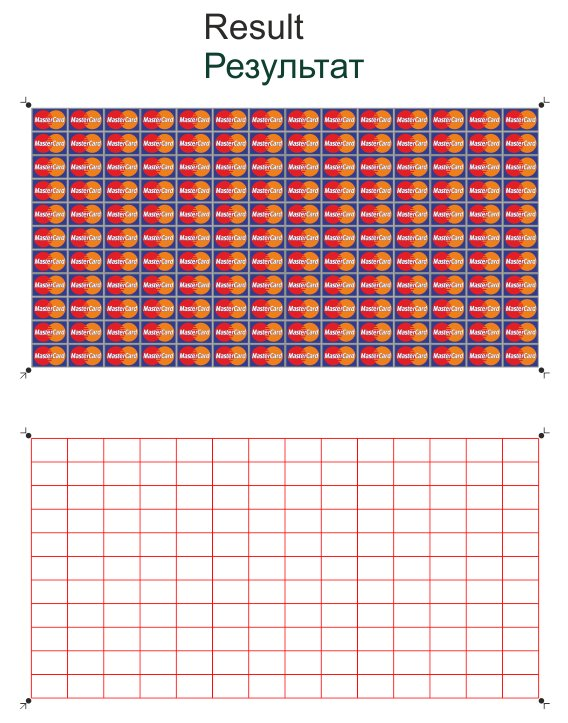
Assign the print shape and its contour, set block size and spacing, and eCut fills the sheet and adds crop marks. Rectangle stickers don’t even need a contour — eCut uses the bounding box.
Camera contour cutting
Contour cutting from a printed image is supported on Roland GX/GR and camera cutters such as Skycut.
How to use it
- 1Group your print artwork and its cut contour separately, so you have just 2 objects.
- 2Open eCut → Contour cutting file and set block size, rows/columns or "fill sheet", and crop mark type.
- 3Select the artwork and click Image: assign, then select the contour and click Contour: assign.
- 4Select both and click Apply — eCut builds the full sheet with crop marks.
- 5Print the sheet, then open eCut Cut/Plot, choose your cutter preset and click Cut/Plot.
New to eCut? Install it in CorelDRAW first — it takes about 10 minutes.
Screenshots


Who it's for
- Flex & vinyl sign shops cutting lettering and logos
- Sticker and label printers doing print-and-cut
- Shops with Chinese COM-port cutters that misbehave on the Windows driver
- Anyone tired of exporting from CorelDRAW to separate cutting software
Part of one eCut license
This tool comes with eCut together with true-shape nesting and 40+ other functions — one lifetime license (₹8,500), CorelDRAW X3–2026, free AnyDesk setup in India. See all functions.
Questions
Can eCut send jobs to a vinyl cutter directly from CorelDRAW?
Yes. eCut Cut/Plot sends curves to any cutter installed as a Windows plotter, or saves a PLT file. For COM-port cutters it can write straight to the port with eCom, without the plotter driver.
Does eCut work with Chinese vinyl cutters?
Yes. If a Chinese (non-offset) cutter stops in wrong places or cuts wrong lines through the driver, use eCut’s eCom, which writes the job straight to the cutter’s COM port.
How do I make a print-and-cut sticker sheet in CorelDRAW?
With eCut Contour Cutting File: assign the print shape and its contour, set sheet and block sizes, and click Apply. eCut fills the sheet and adds crop marks for contour cutting.
Something else? Ask us on WhatsApp — we can show it on your own file over AnyDesk.
More eCut tools
Try contour cutting & plotter output on your own files
Free 4-day demo with every function, or buy the genuine lifetime license.