
How to Install eCut in CorelDRAW
A simple step-by-step guide with screenshots for CorelDRAW 2026 down to X3 — plus quick fixes if the toolbar is missing or buttons don't work.
Quick answer (about 10 minutes)
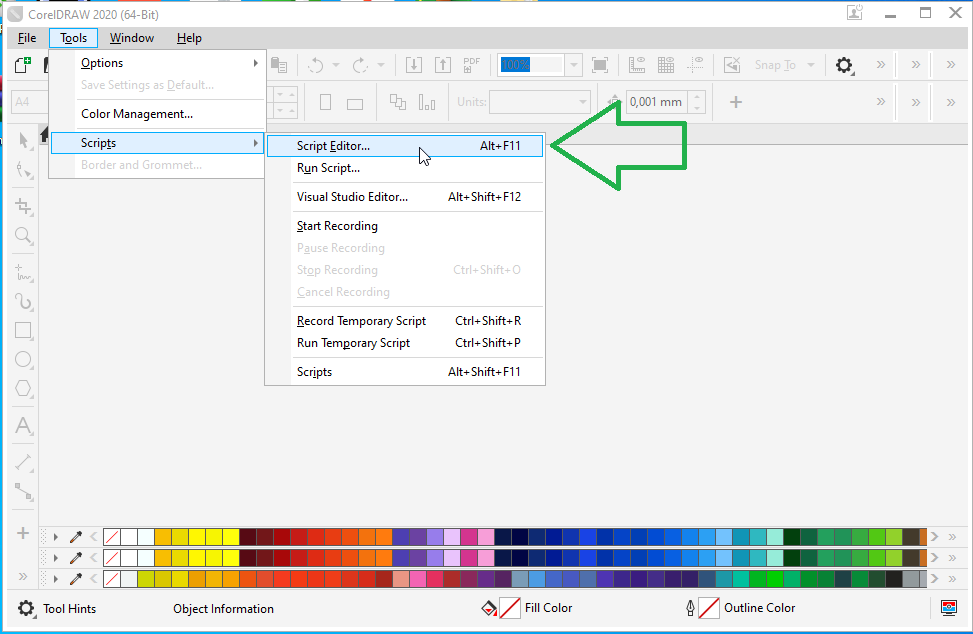
- Check CorelDRAW has VBA: press Alt+F11 — an editor should open.
- Download eCut and extract the ZIP.
- Close CorelDRAW, right-click setup → Run as administrator, tick your CorelDRAW version.
- Open CorelDRAW, right-click the toolbar area and tick eCut.
- Open eCut About, paste your key, click Online Activation.
Before you start
eCut is a plugin, so it runs inside CorelDRAW. Make sure your PC has:
- Windows (eCut for CorelDRAW does not run on Mac)
- A full version of CorelDRAW Graphics Suite X3 to 2026, with its latest updates
- VBA (Visual Basic for Applications) installed with CorelDRAW — check it below
- Screen resolution of at least 1400 × 900
- Internet connection for activation and the free demo
- Not supported: CorelDRAW Home & Student, SE and any copy without VBA.
Supported CorelDRAW versions
All supported by the current eCut 7. Not sure which you have? In CorelDRAW open Help → About.
Check VBA in 10 seconds
Open CorelDRAW and press Alt+F11 (or Tools → Scripts → Script Editor; in older versions Tools → Macros → Macro Editor).
- Editor opens → VBA is fine. Close it and continue.
- Menu is grey or you get an error → VBA is missing. Open Windows Settings → Apps, find CorelDRAW, click Modify, tick Visual Basic for Applications (under Utilities) and finish.
Install eCut in 5 steps
1Download and extract eCut
Get the installer from our download page (or the free demo to try first). Right-click the ZIP and choose Extract All. Don't run setup from inside the ZIP — that is the most common reason installs fail.
2Close CorelDRAW and run setup as administrator
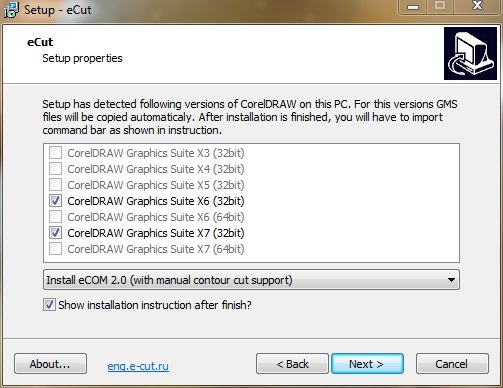
Close CorelDRAW completely. Right-click the eCut setup file → Run as administrator. If Windows SmartScreen appears, click More info → Run anyway.
Setup lists the CorelDRAW versions it found on your PC. Make sure your version is ticked, then click Next until it finishes. eCut installs to C:\eCut.
3Open CorelDRAW and turn on the eCut toolbar
Start CorelDRAW. Right-click an empty part of the toolbar area at the top and tick eCut in the list.
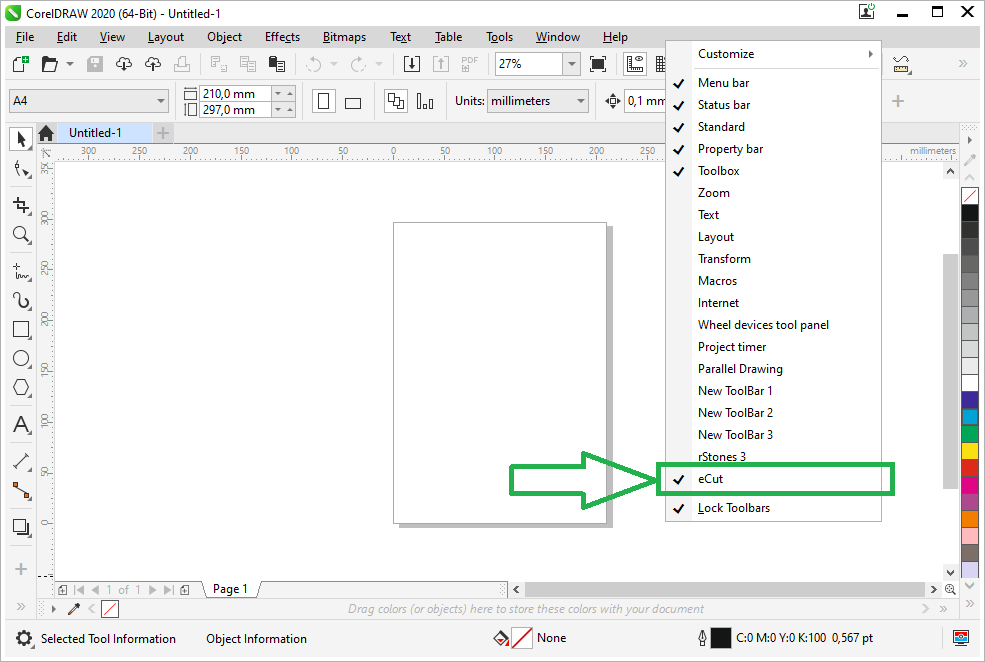

No eCut in that list? Do the toolbar import below — it takes one minute.
4Activate your license key
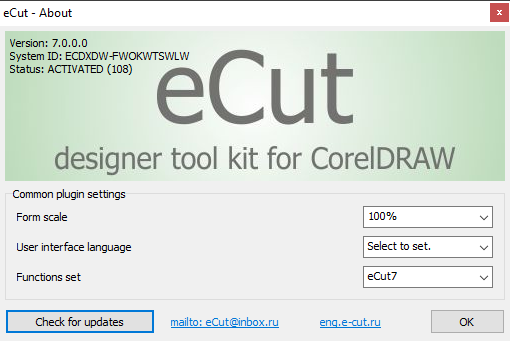
Click any eCut button and open the About window. Paste the activation key from your purchase email into Activation key and click Online Activation.
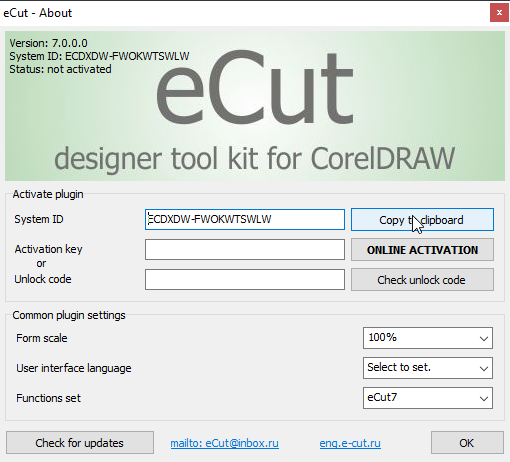
Close and reopen the About window. The status line now says ACTIVATED.
Lost your key? It's in your purchase email and in the User License Portal. More on keys and PC changes: activation guide.
5Run your first job
Draw or open a few shapes, select them and click Nesting on the eCut toolbar to pack them onto your sheet. See what else is on the toolbar in the eCut features list.
Prefer a side panel? eCut also has a docker with every function. If it's not there, install it from C:\eCut\eCut\CorelDRAW Docker (instructions are in the Readme.txt in that folder).
Toolbar missing? Import it manually
- In CorelDRAW open Tools → Options → Workspace.
- Click Import (bottom left).
- Browse to
C:\eCut\eCut\CorelDRAW Toolbar, open the folder for your CorelDRAW version and pick the ENG toolbar file. - Choose Current workspace and click Import.
- Right-click the toolbar area and tick eCut (step 3 above).
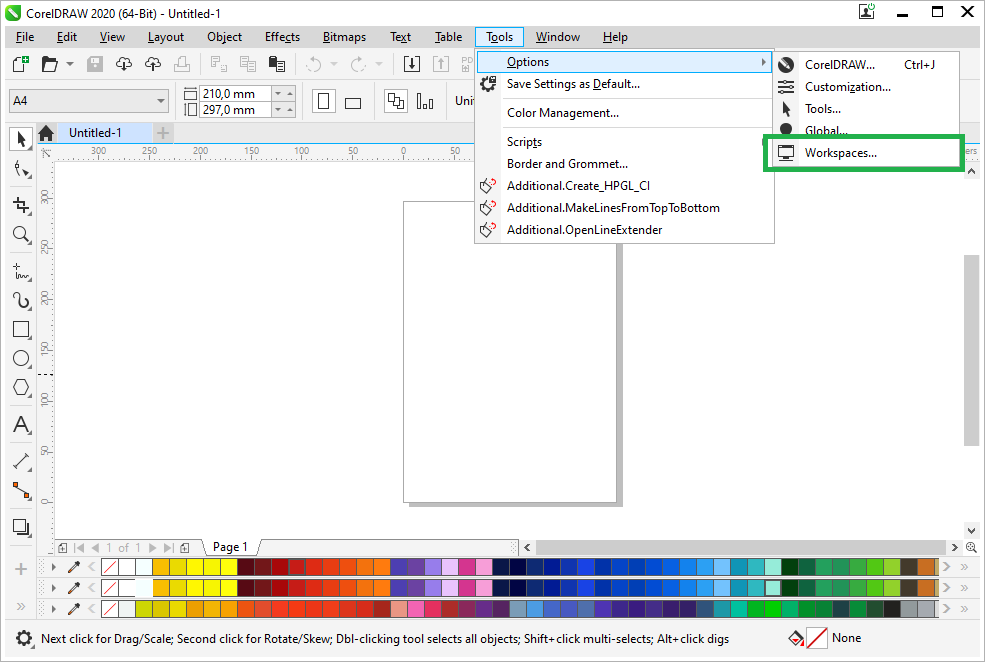
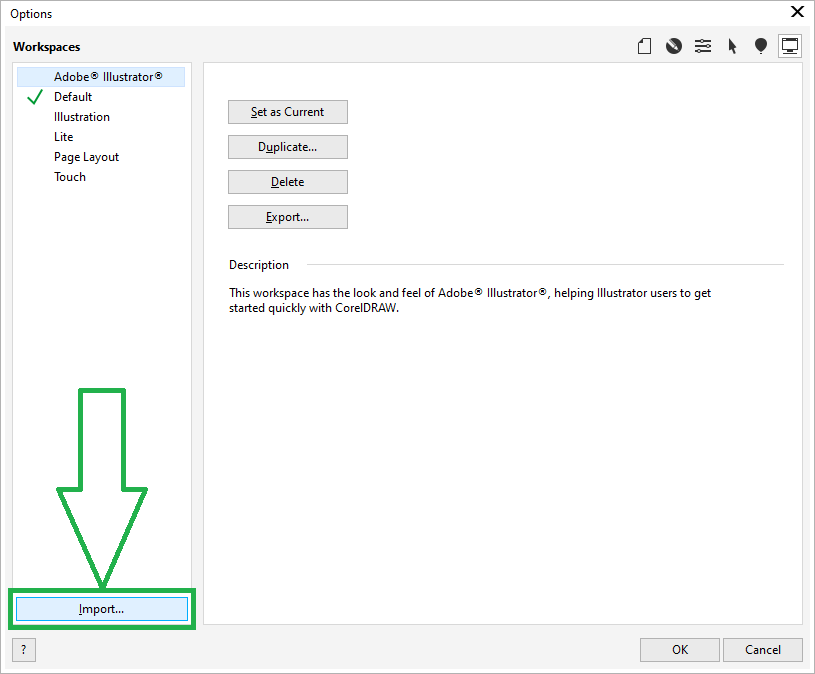
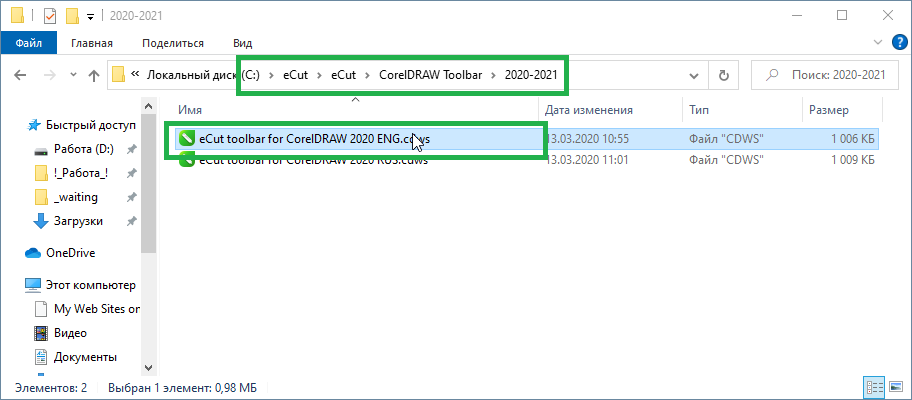
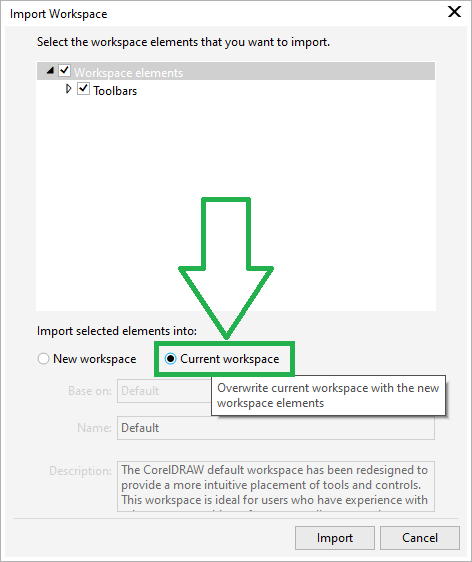
Older CorelDRAW (X3–X8) uses the same idea with a short wizard: Tools → Options → Workspace → Import → pick the file → Next → Finish.
Buttons show but nothing happens? Copy eCut.gms
This means setup couldn't find your CorelDRAW macro folder. Copy one file yourself:
- Close CorelDRAW.
- Open
C:\eCut\eCut\CorelDRAW GMSand then the folder for your CorelDRAW version. Copy the file eCut.gms. - Paste it into your CorelDRAW macro folder:
C:\Users\[your name]\AppData\Roaming\Corel\[your CorelDRAW version]\Draw\GMS
(Tip: type%appdata%\Corelin the File Explorer address bar to get there fast.) - Start CorelDRAW again — eCut now works.
Other common problems
eCut buttons are grey
CorelDRAW's VBA is missing or broken. Do the VBA check. If Alt+F11 doesn't open the editor, repair CorelDRAW with Modify and tick Visual Basic for Applications.
"Select shapes" message on every function
The macro file for a different CorelDRAW version was installed. Run eCut setup again and tick only the version you use, or copy the right eCut.gms yourself. Still happening? Send us a screenshot — we fix it over AnyDesk.
Can't type numbers in eCut boxes
CorelDRAW reserves the 0–9 keys for its own shortcuts. Quick fix: type numbers with the NumPad. Permanent fix: Tools → Customization → Commands, open the Shortcut keys tab and remove the 0–9 shortcuts ("Recall Selection Group").
eCut windows are tiny on a 2K / 4K monitor
Open the eCut About window and raise Form scale (for example 150%).
Activation says "Error connecting to server"
CorelDRAW is being blocked from the internet. Allow CorelDRAW in your antivirus/firewall and try again. Still failing? Click Copy to clipboard next to System ID in the About window and send it with your key on WhatsApp — we help you activate manually.
Antivirus deleted or blocked eCut
eCut loads a DLL through CorelDRAW macros, which some antivirus tools wrongly flag. Restore the file from quarantine and add C:\eCut as an exception. Only use the installer from this site.
Formatted Windows or moved to a new PC
Install eCut again with the steps above. Your old activation is tied to the old PC, so message us and we move your license to the new PC at no extra charge. Details.
Demo (4-day trial) won't start
The free demo needs an internet connection and CorelDRAW must not be blocked by antivirus or firewall. Open eCut About and use the compatibility check button: if it creates a page showing the eCut and CorelDRAW versions, your CorelDRAW is compatible.
Want us to install it for you?
Rockers Systems & Solutions installs and activates eCut on your PC over AnyDesk for free when you buy a license — in Hindi or English. WhatsApp +91 81888 16160 (Monday to Saturday, 9:00 AM – 8:00 PM IST).
Related: activate eCut, download, free trial, FAQ, why not a crack
Need a genuine eCut key?
Lifetime license, works with CorelDRAW X3–2026, free AnyDesk setup across India.